
How to Check BISE Gujranwala Matric Result 2026 Online
Check BISE Gujranwala Matric Result 2026 Online
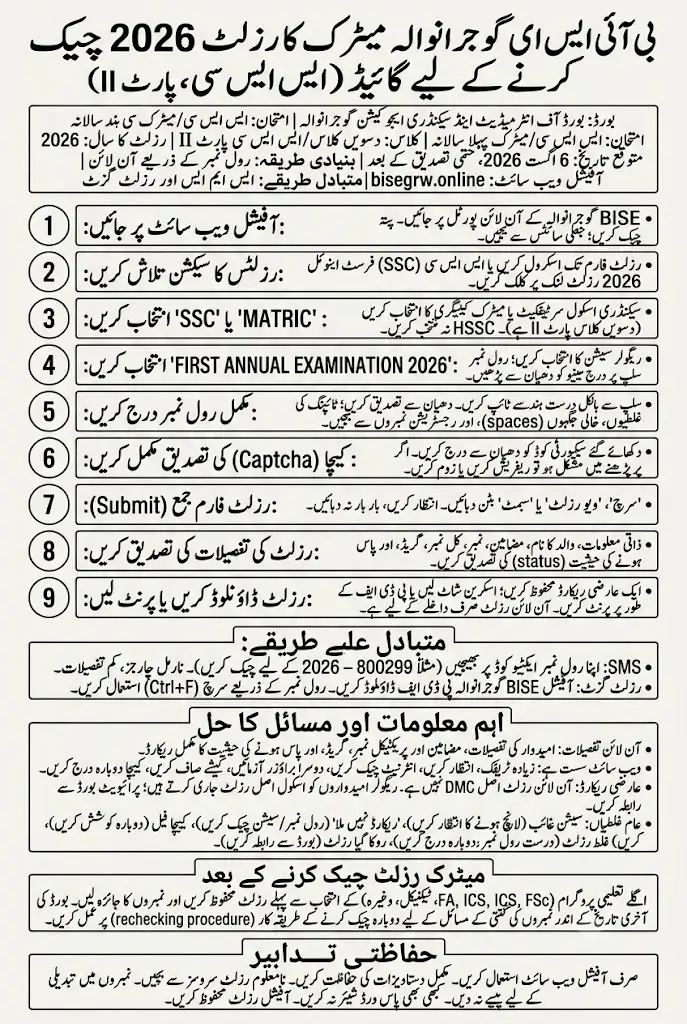
Students can check the BISE Gujranwala Matric Result 2026 through the board’s official online result system. Select the SSC examination and 2026 session, enter your roll number, complete the security code and submit the form. Your subject-wise marks, total score and result status will appear on the screen.
The online method is the most helpful option because it normally provides more details than an SMS response. Students should keep their original roll number slip nearby and verify the selected examination session before searching for the result.
BISE Gujranwala Matric Result 2026 Overview
| Detail | Information |
|---|---|
| Board | Board of Intermediate and Secondary Education Gujranwala |
| Examination | SSC/Matric First Annual Examination |
| Class | 10th Class/SSC Part II |
| Result Year | 2026 |
| Result Status | Check the latest official announcement |
| Expected Date | 6 August 2026, subject to final confirmation |
| Main Checking Method | Online by roll number |
| Required Information | Exam session, roll number and security code |
| Official Website | bisegrw.online |
| Alternative Methods | SMS and result gazette |
The result date should be verified through the final notification issued by BISE Gujranwala. Students should not rely on social-media posts that describe an expected date as officially confirmed without linking to a board notice.
The official Gujranwala Board website currently provides an online results section with examination-selection fields, a roll-number field and captcha verification.
Also Check: BISE Rawalpindi Board 10th Class Result Check 2026
Gujranwala Board Districts Covered by the Result
The BISE Gujranwala Matric Result applies to regular and private candidates registered under the board’s jurisdiction. Gujranwala Board traditionally covers:
- Gujranwala
- Gujrat
- Sialkot
- Hafizabad
- Narowal
- Mandi Bahauddin
Students should make sure that their examination was registered with BISE Gujranwala. Candidates belonging to another educational board must use the result portal of that board instead.
How to Check BISE Gujranwala Matric Result 2026 Online
The board’s online system may require students to select several options before entering a roll number. The exact labels can change when the 2026 result is uploaded, but the basic process remains straightforward.
Step 1: Visit the Official BISE Gujranwala Website
Open the BISE Gujranwala online portal using a mobile phone, tablet or computer.
Check the website address before entering your roll number. Avoid pages that request a password, bank information, CNIC image, registration fee or other unrelated personal information merely to display a public examination result.
Step 2: Find the Results Section
Scroll to the Results section on the official website. The result form contains menus for selecting the examination and result session, along with a field for the student’s roll number.
If a 2026 result link appears separately on the homepage, open the link marked for the SSC or Matric First Annual Examination 2026. Do not select HSSC because that category is used for intermediate examinations.
Step 3: Select SSC or Matric
Choose the SSC, Matric or Secondary School Certificate category. The 10th class result is part of SSC Part II.
Do not select:
- HSSC or Intermediate
- SSC Part I or 9th class
- An older examination year
- Second Annual if you appeared in the First Annual examination
- Marks improvement unless you registered in that category
Read every menu label carefully before continuing.
Step 4: Choose the First Annual Examination 2026
Select the option referring to the SSC First Annual Examination 2026 or 10th Class Annual Result 2026. Match the examination type with the information printed on your roll number slip. A student who appeared in the regular First Annual examination should not select a Second Annual or supplementary session.
If the 2026 option is not visible, the board may not have activated the result database yet. Wait for the official announcement instead of selecting a previous year.
Step 5: Enter Your Complete Roll Number
Type the roll number exactly as printed on your examination slip. Check every digit before submitting the form.
Avoid these common mistakes:
- Entering a registration number
- Missing the first or last digit
- Adding spaces
- Typing punctuation
- Using a friend’s roll number by mistake
- Entering a 9th class roll number
- Selecting 2025 but current is 2026
One incorrect digit can show another student’s record or produce a “result not found” message.
Step 6: Complete the Captcha Verification
The official website may ask you to enter a captcha or security code. This step confirms that a real person is using the result system.
Enter the displayed characters carefully. If the image is difficult to read:
- Refresh the captcha.
- Increase your screen brightness.
- Zoom in on the image.
- Enter the replacement code.
- Check similar-looking letters and numbers.
A captcha error is unrelated to your examination result. It simply means the security code needs to be entered again.
Step 7: Submit the Result Form
Review the selected examination, year and roll number, then press the search, view result or submit button.
The result may take a few seconds to load during busy periods. Avoid pressing the button repeatedly, as several simultaneous requests can make the page respond more slowly.
Step 8: Verify That the Result Belongs to You
When the result appears, first confirm your personal details. Do not rely only on the displayed marks.
Check:
- Student’s name
- Father’s name
- Roll number
- Examination session
- Group or category
- Subject names
- Subject-wise marks
- Practical marks, where applicable
- Total marks
- Grade
- Pass, fail or compartment status
If the name or roll number does not match, return to the form and search again using the correct information.
Step 9: Download or Print Your Result
Save a copy after confirming the record. You can take a full-page screenshot or use the browser’s print option.
On a computer:
- Press ctrl+P.
- Select Save as PDF.
- Check that the complete result is visible.
- Save the file with your name and roll number.
On a mobile phone, use the screenshot option or choose Print from the browser menu if that feature is available.
Check: BISE Sargodha 10th Class Result 2026
Details Shown on the Online Matric Result
The online Gujranwala Board result normally provides a more complete record than the short SMS method. The exact layout may vary, but students can expect to see:
- Candidate’s name
- Father’s name
- Roll number
- Examination name
- Individual subject marks
- Theory and practical marks
- Total marks
- Grade or division
- Pass or fail status
- Subjects requiring a second annual examination
Review every subject carefully. A student may pass overall but still need to understand performance in individual subjects before selecting an intermediate study group.
Why Online Checking Should Be Your First Choice
The online method is usually the best way to view the Gujranwala Board Matric Result because it provides subject-level details. It also allows students to save a provisional record immediately.
SMS is useful when mobile internet is unavailable, but the reply may contain only basic information. A result gazette is helpful for schools or name-based searches, yet it may not provide the complete subject breakdown available through the official online result page.
What to Do When the Gujranwala Result Website Is Slow
A large number of students may open the result portal at the same time. This can cause slow loading, temporary errors or a blank page.
Try the following steps:
- Wait for a few minutes before trying again.
- Check your internet connection.
- Switch between Wi-Fi and mobile data.
- Open the portal in another browser.
- Close unnecessary browser tabs.
- Clear the browser cache.
- Disable an unnecessary VPN or proxy.
- Re-enter the captcha.
- Try again after the initial result-day rush.
- Open the result section through the official homepage.
Do not assume that a slow website means your result is missing or withheld.
Common Result-Checking Errors and Their Solutions
The 2026 Examination Option Is Missing
The board may not have activated the new result session. Wait for the official announcement and check the portal again. Do not select 2025 to search for a 2026 result.
“No Record Found” Appears
Check that the roll number is correct and the SSC First Annual 2026 session is selected. Remove any extra spaces and submit the form again.
Captcha Keeps Failing
Refresh the captcha and type the new code. Make sure you are not confusing letters with similar-looking numbers.
Another Student’s Result Appears
Return to the form and compare your roll number with the original slip. One incorrect digit can open a different record.
The Page Opens but the Result Does Not Load
The result database may not be active, or the server may be handling too many requests. Wait and try again through the official portal.
Result Is Marked as Withheld
A withheld result cannot usually be resolved by repeatedly searching online. Contact your institution or BISE Gujranwala for the reason and required procedure.
Check: 10th Class Result Check Online BISE DG Khan
Checking the Result Without a Roll Number
The official online method primarily depends on the roll number. If you have lost your roll number slip, contact your school because it should have a record of registered candidates.
Private students can check their admission documents or the roll number slip service provided through the official board portal. The result gazette may also help locate a record by name, but students with identical names must compare the father’s name, institution and other available details.
SMS Method For Gujranwala Board 10th Class Result Check
Students may use the SMS service if the website is unavailable. The code commonly used for BISE Gujranwala results is 800299, but it should be checked against the board’s final 2026 instructions before use.
Type only the roll number in a new message and send it to the active board code. Normal network charges may apply, and the reply may provide fewer details than the online result.
Gujranwala 10th Class Result Gazette Method
The result gazette contains a large list of candidates and their result information. Once the correct SSC First Annual 2026 gazette becomes available, download it and search by roll number.
Press ctrl+F on a computer or use the search icon in a mobile PDF reader. Always confirm that the gazette belongs to BISE Gujranwala, the 10th class and the correct examination session.
What to Do After Checking Your Matric Result
Save your result and review the subject marks before choosing your next academic programme. Available options may include FSc Pre-Medical, FSc Pre-Engineering, ICS, ICom, FA or technical education.
Select a study group according to your interests, strongest subjects, admission requirements and long-term plans—not only because friends have chosen it.
If you believe a paper contains a counting or unchecked-answer issue, follow the official rechecking process within the deadline announced by BISE Gujranwala. Rechecking rules, fees and application dates should be confirmed directly through the board.
Keep Your Result Information Safe
A public result search generally needs only limited information. Protect yourself by following these precautions:
- Use the official board website.
- Do not share your complete documents publicly.
- Avoid unknown WhatsApp result services.
- Do not pay anyone to “increase” your marks.
- Never share an account password or verification code.
- Save the official result for your own record.
- Report suspicious pages pretending to represent the board.
No third party can legally change a board result in exchange for payment.
Check: Check BISE Multan 10th Class Result 2026 by Roll Number
FAQs
How can I check my BISE Gujranwala Matric Result 2026 online?
Visit the official board website, open the Results section, select SSC First Annual 2026, enter your roll number, complete the captcha and submit the form.
What information is required to check the result?
You normally need the examination category, result session, year, roll number and captcha displayed on the result form.
Why is the 2026 result option not showing?
The result database may not have been activated. Wait for the official BISE Gujranwala announcement and check the portal again.
Can I check my result using my registration number?
The standard online result method uses the examination roll number. Enter the number printed on your SSC roll number slip.
Can I view individual subject marks online?
The online result generally provides subject-wise marks, total marks and result status. The exact information depends on the format released by the board.
What should I do if the official website is not opening?
Wait briefly, change your internet connection, try another browser or use the official SMS method. Avoid submitting personal information to unknown websites.
Can I print my online Gujranwala Board result?
Yes. You can print the page or save it as a PDF. The online result remains provisional and does not replace the original DMC.
What should I do if my name or marks appear incorrect?
Save the displayed record, verify it through your school and contact the board through official channels. Follow the correction or rechecking procedure relevant to the issue.
Final Words
The safest way to check the BISE Gujranwala Matric Result 2026 is through the board’s official online result system. Select the correct SSC First Annual 2026 session, enter your roll number carefully and save the result after verifying all personal details and subject marks.