
How to Check BISE Multan 10th Class Result 2026 by Roll Number
Check BISE Multan 10th Class Result 2026
The BISE Multan has been officially released the 10th class result 2026 today. Students can check the BISE Multan 10th Class Result 2026 online through the board’s official result portal. You need to enter your roll number, select the SSC 10th/Combined First Annual 2026 session and submit the form. Once the result is released, your marks and result status should appear on the screen.
The online method is the most convenient option because it provides more information than an SMS result. You can view your subject-wise marks, total score and pass or fail status from a mobile phone or computer.
If you are interested and want to know the step by step method to check result online via official portal then you are at right place. You will get the complete guide here. Read the below information and know the full detail.
BISE Multan Result 2026 Overview
| Detail | Information |
|---|---|
| Board | Board of Intermediate and Secondary Education Multan |
| Examination | SSC 10th/Combined First Annual Examination |
| Result Year | 2026 |
| Result Status | Has bee released |
| Expected Date | 6 August 2026 |
| Expected Time | 10:00 AM |
| Main Checking Method | Online by roll number |
| Result Portal | BISE Multan 10th/Combined Results |
| Alternative Methods | SMS and result gazette |
The Punjab matric result schedule currently points to 6 August 2026 for the 10th class result. However, students should treat the date and time as subject to the final BISE Multan announcement.
Official online result has been released and you can check online. BISE Multan is expected to add SSC (10th/Combined) 1st Annual 2026 when the result is ready for publication.
Also Check: BISE Rawalpindi Board 10th Class Result Check 2026
How to Check BISE Multan 10th Class Result 2026 Online
Checking the result by roll number is straightforward. Keep your original roll number slip nearby and use the following steps.
Step 1: Open the Official BISE Multan Website
Visit the official BISE Multan website. Make sure that the address belongs to the bisemultan.edu.pk domain before entering your roll number.
Avoid websites that ask for your CNIC, password, payment or unnecessary personal information. The standard official result form requires a roll number and examination session.
Step 2: Open the 10th Class Result Section
On the board website, open the Exams & Results menu. Under the SSC or Matriculation section, select Know Your Results 10th.
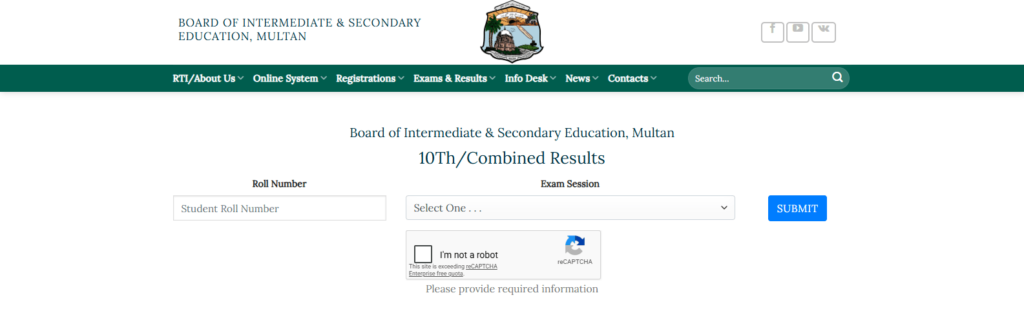
You can also open the BISE Multan 10th/Combined result page directly. The official page contains a roll-number field, an exam-session menu and a Submit button.
Step 3: Enter Your Roll Number
Enter your complete roll number exactly as it appears on your examination roll number slip. Check every digit before continuing.
Do not add:
- Your name
- Registration number
- CNIC number
- Spaces before or after the roll number
- Extra symbols or punctuation
A single incorrect digit may display another student’s record or produce a “no result found” message.
Step 4: Select the Correct Examination Session
Open the Exam Session menu and select “SSC (10th/Combined) 1st Annual 2026”
This option may only become available close to the result announcement. Do not select a 2025 session when checking the 2026 annual result.
Students checking a later supplementary or second annual examination must choose the corresponding 2nd Annual 2026 session when it becomes available.
Step 5: Press the Submit Button
After confirming the roll number and examination session, select Submit. The result should load after the board officially releases it.
The result page may take longer than usual to open during the first few minutes after the announcement. Avoid pressing Submit repeatedly, as multiple requests may make the page less responsive.
Step 6: Check Your Result Carefully
When the record appears, check that the following details belong to you:
- Student’s name
- Father’s name
- Roll number
- Examination session
- Subject-wise marks
- Total marks
- Grade or result status
- Any subject marked for a second annual examination
If the name or roll number is different, return to the result form and enter your details again.
Step 7: Save or Print the Online Result
Take a clear screenshot or use the browser’s print option to save the page as a PDF. This online result can be useful for checking marks and beginning the college admission process.
However, the online record should be treated as a provisional result. The original Detailed Marks Certificate or official result card is issued through the board or the student’s institution.
Check: BISE Sargodha 10th Class Result 2026
What Information Appears in the Online Result?
The online BISE Multan result normally provides more information than the short result received through SMS. Depending on the record and examination session, it may show:
- Candidate’s name and roll number
- Father’s name
- Subject names
- Individual subject marks
- Total marks
- Pass, fail or compartment status
- Grade or remarks
- Examination year and session
Review every subject instead of looking only at the total marks. If a subject is missing or the displayed record does not match your details, verify it through your school and the official board portal.
What to Do if the Result Page Is Not Working
The BISE Multan website may become slow when many students open it simultaneously. A delayed page does not mean that your result is missing.
Try these solutions:
- Wait for a few minutes before reloading the page.
- Check that your mobile internet or Wi-Fi is working.
- Open the website in another browser.
- Remove extra spaces from the roll number.
- Confirm that you selected the 2026 First Annual session.
- Try again when result-day traffic becomes lighter.
- Use the official SMS method if the portal remains unavailable.
Do not enter your details on an unknown website merely because the official portal is temporarily slow.
“No Result Found” Error
A “no result found” message can appear for several reasons. The roll number may be incorrect, the wrong examination session may be selected, or the 2026 result may not have been activated yet.
Check the roll number against your original slip and confirm that you selected SSC (10th/Combined) 1st Annual 2026. If the information is correct but the result remains unavailable, contact your school or BISE Multan support.
The board lists the public inquiry number as 061-9210125 and the IT support email as support@bisemultan.edu.pk on its official portal.
Can You Check the Result Without a Roll Number?
The official online result form is mainly designed for roll-number searches. If you have lost your slip, first ask your school for the roll number. Regular institutions normally maintain students’ examination records.
Private candidates may check their admission documents or use the board’s student-record services. The BISE Multan website also provides a Trace Your Record 10th option under its SSC services.
Check: BISE Gujranwala Board 10th Class Result 2026
Brief Alternative: Check Through SMS
If the official website is slow, you may use BISE Multan’s result SMS service. Enter only your roll number in a new message and send it to the SMS code 800293 set by the board for the 2026 result.
SMS usually provides a shorter result and may carry normal network charges.
Alternative Method To Check 10th Class Result 2026
BISE Multan also maintains a matric result-gazette section. After the 2026 gazette becomes available, download the relevant PDF and search it using your roll number.
On a computer, press ctrl+F; on a mobile PDF reader, use the search icon. The gazette is useful if the main result form is unavailable, but it may not show the same detailed subject information as the online roll-number record.
What to Do After Viewing Your Result
Save a copy of the result and check all personal and academic details. Students who pass can use their marks to plan admission to FA, FSc, ICS, ICom or another suitable programme.
If you believe a paper contains a counting or marking-record issue, use the official rechecking application service within the period announced by BISE Multan. Rechecking does not normally mean that the entire answer sheet will be marked again; follow the board’s published rules before applying.
FAQs
How can I check my BISE Multan 10th class result online?
Open the official BISE Multan 10th/Combined result portal, enter your roll number, select the 2026 First Annual session and press Submit.
When will the BISE Multan 10th Class Result 2026 be available?
The BISE Multan 10th class result has been officially released on today at 10:00 AM. Students should verify the final date through the BISE Multan announcement.
Can I check the result using my registration number?
The standard BISE Multan online result form asks for a roll number and examination session. Use the roll number printed on your examination slip.
What should I do if I enter the wrong roll number?
Return to the result page and enter the correct number. Check every digit and remove any unnecessary spaces before submitting the form again.
Is the online result card the original certificate?
No. The result displayed online is a provisional record. Obtain the original marks certificate or result card through your school or the procedure announced by BISE Multan.
Can I check an old BISE Multan matric result?
Yes. The official result form contains several previous First Annual and Second Annual examination sessions. Select the correct year and session before submitting your roll number.
Check: 10th Class Result Check Online BISE DG Khan
Final Words
The easiest way to check the BISE Multan 10th Class Result 2026 is through the official online portal using your roll number. Keep your slip ready, select the correct 2026 examination session and save a copy of the displayed result for your records.