
BISE Multan Result Gazette 2026 PDF Download For 10th Class
BISE Multan Result Gazette 2026
The Multan Board has released the 10th class result and students can check their results sitting at home. If the website is not opening or you do not have internet, then you can download the PDF of the result sitting at home and search for your roll number or name in it and see the result. Because this is a great method, with this you can easily check your result without difficulty and without internet and know whether you have passed or failed.
If you are interested in this article and want to know all its information, how you can download this gazette i.e. PDF sitting at home and how you can check your result in it, then its complete details are given below. You can read the complete article and get all its information.
Quick Answer
The BISE Multan 10th Class Result Gazette 2026 will be published after the result announcement on 6 August 2026. To download it, visit the official BISE Multan Matric Gazette page, open the SSC First Annual Examination 2026 entry and download its PDF. You can then press
Ctrl + Fto find a result by roll number or name.
BISE Multan Matric Gazette 2026 Overview
| Result detail | Information |
|---|---|
| Board name | Board of Intermediate and Secondary Education Multan |
| Examination | SSC/10th Class First Annual Examination |
| Result year | 2026 |
| Result date | 6 August 2026 |
| Result time | 10:00 AM |
| Gazette status | Awaiting official upload |
| Gazette format | |
| Search options | Roll number, name and institution |
| Covered districts | Multan, Khanewal, Vehari and Lodhran |
| Official website | web.bisemultan.edu.pk |
BISE Multan Result Gazette 2026 PDF Latest Update
The official BISE Multan result portal states that the SSC 10th/Combined First Annual Examination 2026 result is available online on 6 August 2026 at 10:00 AM. The result Gazette is normally published with or shortly after the online result announcement by the official BISE Multan result portal.
As of 1 August 2026, the board’s official Matric Gazette section contains earlier examination Gazettes, but the SSC First Annual Examination 2026 PDF has not appeared there. Therefore, students should treat any unofficial 2026 Gazette file circulating before the announcement with caution.
We will change the status from “awaiting upload” to “available for download” and provide the direct official file when it is released.
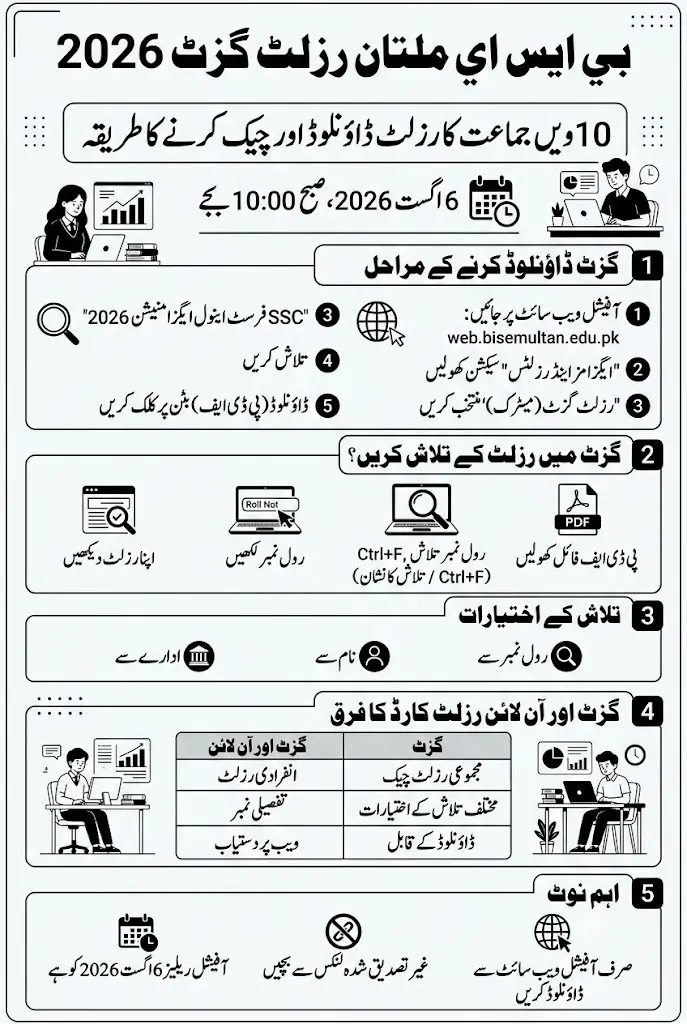
How to Download BISE Multan Result Gazette 2026 PDF
Follow these steps after BISE Multan uploads the Gazette:
- Visit the official BISE Multan website.
- Open the Exams & Results section.
- Select Result Gazette (Matric).
- Look for Result Gazette SSC First Annual Examination 2026.
- Open the Gazette entry.
- Click the available PDF or download button.
- Wait for the complete file to download.
- Open it using a PDF reader or web browser.
- Save a copy on your mobile phone or computer.
If the 2026 entry does not appear, it means the board has not uploaded the file yet. Refresh the official page after the result announcement instead of downloading an unverified document from an unknown website.
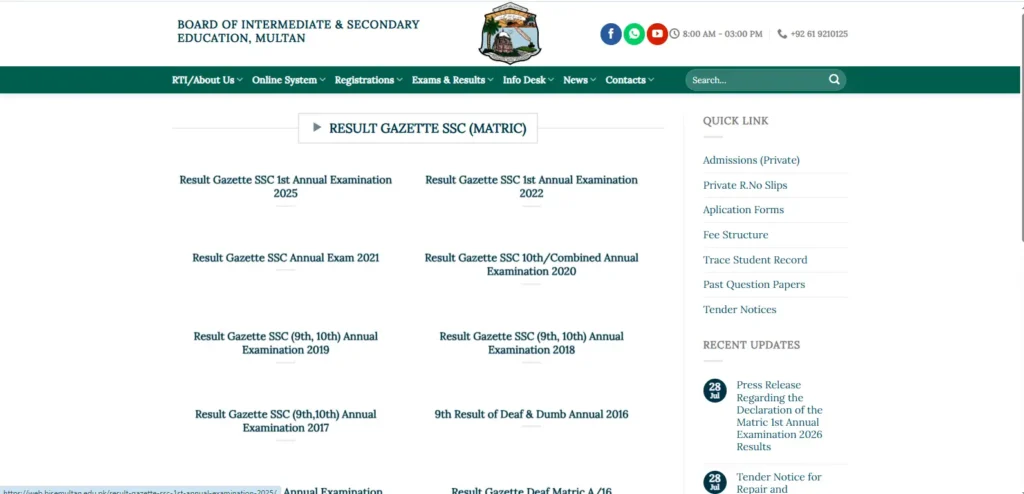
Direct BISE Multan Gazette Download Link
The direct 2026 PDF link has been published. Students can check the official section below:
Official Gazette Page: Download BISE Multan Matric Result Gazette
The board’s page currently lists the SSC First Annual Examination 2026 and several older Gazettes. The 2026 Gazette has added here only after its official release. This article will also be updated when the direct file becomes available.
How to Check a Result in the Gazette by Roll Number
A roll-number search is the fastest and most accurate way to find an individual record in a large Gazette PDF.
After downloading the file:
- Open the Gazette on your computer.
- Press ctrl + F on a computer or laptop. Or click on the search button in the mobile
- Mac users can press command + F.
- Enter the complete examination roll number.
- Press Enter or select the search icon.
- Check the matching candidate record.
- Verify the student’s name and result status.
Mobile users should open the PDF in an application that offers Find in document or Search. Enter only the roll-number digits without spaces or additional words.
If no result appears, check that you downloaded the correct SSC First Annual Examination Gazette and entered every digit correctly.
How to Find the 10th Class Result by Name
The Gazette can also help students who have forgotten their roll numbers. Open its search feature and enter the candidate’s full name using the spelling recorded by the board.
A name search may display more than one student because different candidates can have identical names. Verify the record through the roll number, father’s name, school or institution information wherever these details are available.
Searching by name may also fail when the PDF contains scanned pages rather than selectable text. In that situation, obtain the roll number from the school or use the BISE Multan record-tracing facility.
How Schools Can Use the Gazette
The Gazette is particularly useful for schools because it contains consolidated examination information. An institution can check multiple candidates without opening a separate online result card for every student.
Schools use it to:
- Search the results of several candidates
- Prepare school result summaries
- Compare pass and performance records
- Identify candidate roll numbers
- Maintain a provisional academic record
- Review institution-level result information
However, the Gazette should not be treated as a replacement for an official detailed marks certificate. It provides result information but may not display complete subject-wise marks for every candidate.
Gazette PDF and Online Result Card Difference
| Feature | Result Gazette | Online result card |
|---|---|---|
| Main purpose | Search multiple results | Check one detailed result |
| Search method | Roll number, name, father name or institution | Roll number and exam session |
| Subject-wise marks | No available | Normally available |
| Best for | Schools and bulk searches | Individual students |
| Format | Downloadable PDF | Online result page |
| Internet needed | Only for initial download | Required for every search |
Students who need detailed subject marks should use the online portal. Those checking multiple candidates or searching without a roll number may find the Gazette more useful.
How to Check the Result on the Official Portal
Students do not have to wait for the Gazette if they know their roll number. The individual online result can be checked using the following method:
- Open the official BISE Multan result portal.
- Enter the complete student roll number.
- Open the Exam Session dropdown menu.
- Select SSC (10th/Combined) First Annual Exam 2026 Results.
- Tick the I’m not a robot reCAPTCHA box.
- Complete any verification challenge that appears.
- Recheck the entered roll number and selected session.
- Click the blue Submit button.
- View the provisional result card.
- Save a screenshot or print the result.
If the portal shows “Please provide required information,” confirm that the roll number, examination session and reCAPTCHA have all been completed.
What to Do If the Gazette Is Not Downloading
Result-day traffic may temporarily slow down the board website. This does not necessarily mean the Gazette has been removed or is unavailable.
Try these solutions:
- Wait for several minutes before trying again.
- Refresh the official Gazette page.
- Switch between mobile data and Wi-Fi.
- Open the page in another browser.
- Make sure your device has enough storage.
- Use a stable internet connection for a large PDF.
- Download the file during a less busy time.
- Check the individual result through the online portal.
Avoid repeatedly pressing the download button because this may create incomplete or duplicate files.
Gazette PDF Opens but Search Does Not Work
Some PDF files contain scanned text that cannot be searched normally. If ctrl + F does not find a known roll number, try opening the document in another PDF application.
You can also:
- Update your PDF reader.
- Download the file again if it is incomplete.
- Search using the complete roll number.
- Try the student’s exact registered name.
- Use optical character recognition if the PDF is image-based.
- Check the result through the official online portal.
The online roll-number system remains the preferred option for complete subject-wise marks.
Districts Included in the Multan Board Gazette
The BISE Multan Gazette covers candidates who appeared under the board from its assigned jurisdiction. The main districts include:
- Multan
- Khanewal
- Vehari
- Lodhran
Students from schools and examination centres in these districts can search the same SSC Gazette, provided BISE Multan issued their roll numbers.
Is the Result Gazette an Official Certificate?
No. The Gazette is an official consolidated result record, but it is not the student’s original Secondary School Certificate or detailed marks certificate.
The online result and Gazette can be used to check provisional marks and status immediately. Regular students generally receive official documents through their schools, while private candidates should follow the collection or delivery instructions issued by BISE Multan.
Important Safety Advice
Download the Gazette only from the official bisemultan.edu.pk domain or a trusted page linking directly to the board file. An SSC result does not require an ATM PIN, banking password or payment to unlock.
Files shared through social media before the result announcement may be outdated, renamed or unofficial. Confirm the examination year and session before relying on any downloaded Gazette.
FAQs
When will the BISE Multan 10th Class Result 2026 be announced?
The official result portal says the 10th/Combined First Annual Examination 2026 result will become available on 6 August 2026 at 10:00 AM.
Is the BISE Multan Result Gazette 2026 PDF available?
The 2026 PDF has not been uploaded to the official Matric Gazette section as of 1 August 2026. It is expected after the result announcement.
Where can I download the official Gazette?
You can download it from the official BISE Multan Matric Gazette section once the board publishes it.
Can I search the Gazette by roll number?
Yes. Open the downloaded PDF, press Ctrl + F, enter the complete roll number and view the matching record.
Can the result be checked by name?
You can search the Gazette using the student’s registered name. Confirm the roll number or institution because multiple students may have the same name.
Does the Gazette show subject-wise marks?
A Gazette may provide limited consolidated result information. Use the official roll-number portal for a detailed provisional result card and subject-wise marks.
Why is the Gazette download page not opening?
Heavy result-day traffic can slow the official website. Wait briefly, change your internet connection or try again during a less busy time.
Can I use the Gazette instead of the original result card?
No. It is useful for provisional result checking but does not replace the official detailed marks certificate or Secondary School Certificate.
You Can Also Check:
Conclusion
The BISE Multan Result Gazette 2026 PDF will help students and schools check 10th Class results by roll number, name and institution. The result is scheduled for 6 August 2026 at 10:00 AM, while the Gazette PDF is expected to be uploaded after the official announcement.
Use the BISE Multan Gazette section to obtain the authentic document and avoid unverified files. As soon as the board uploads the 2026 Gazette, we will add the direct PDF download link and update its status so stay connected with us.
Official Sources
This guide was prepared using the official BISE Multan result portal, BISE Multan website and official Matric Gazette section. The official portal confirms the result date and time, while the Gazette section currently lists previous SSC Gazettes.